
Create your seller account
One short form, then confirm your email. About two minutes.
- Open the sign-up page. Go to Sell with us. On a computer it’s at the top of every page, next to My Account. On a phone, open the menu (All) and tap Sell on One Dollar Shopper. It’s also in the footer, under Make Money with Us.
- Fill in your details: first name, last name, email and phone.
- Type your shop name. Your shop’s web address appears under it. If it says Taken, try another, change the address a little, for example by adding your city.
- Choose a password of at least 8 characters. Tap Show to check what you typed.
- Tick the box to agree to the Seller Terms. Read them first: they explain fees, tax, shipping and payouts.
- Tap Create my shop.
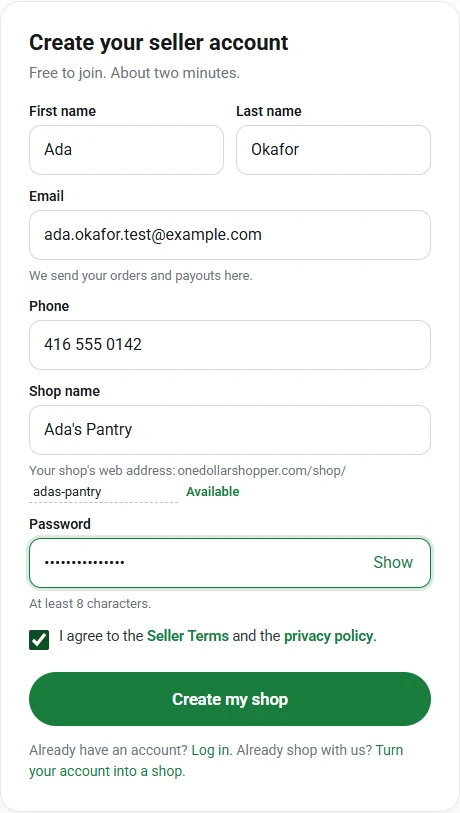
The sign-up form, filled in - Confirm your email. We send you an email straight away. Open it and tap Confirm my email. You’re logged in and your shop setup opens.
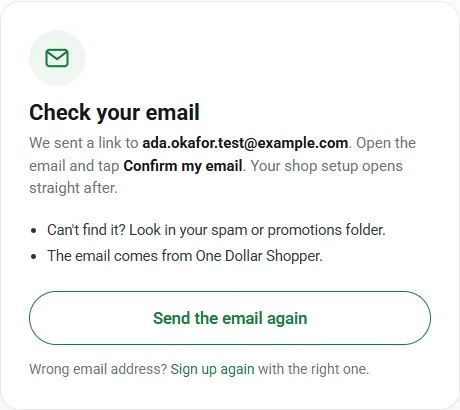
What you see after signing up
If something goes wrong
- No email? Look in your spam or promotions folder. On the Check your email screen, tap Send the email again. If you closed that screen, go to My Account, log in, and use the Send again link in the message.
- “An account is already registered with your email address.” You already have an account with us. Log in, then follow Already shop with us? Turn your account into a shop.
- Forgot your password? Use Reset your password.
- “Something went wrong with the form.” Reload the page and try again.